

The problem
Teams do not know what is available or how catalog, system, and custom apps differ.
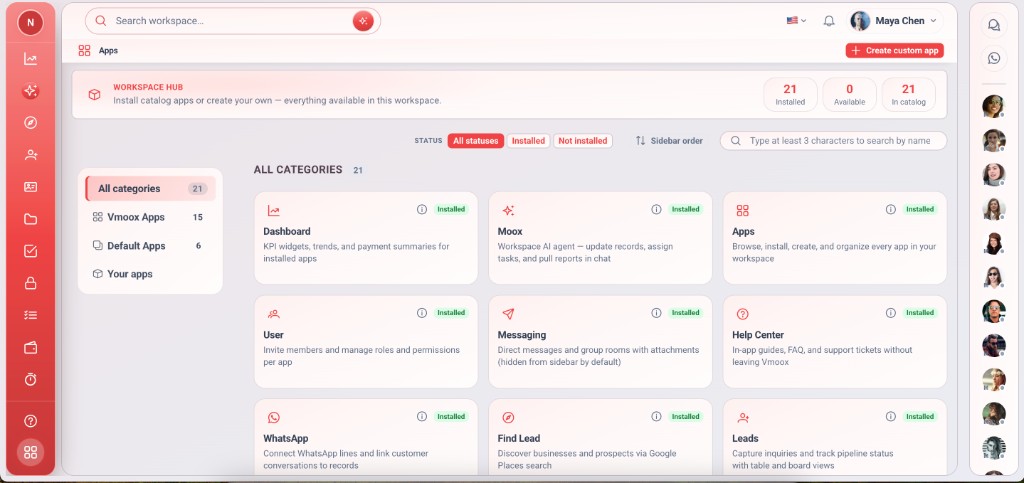
The app store inside your workspace — three sections: Vmoox Apps, Default Apps, and Your apps. Install, reorder the sidebar, and create custom records apps.
Teams do not know what is available or how catalog, system, and custom apps differ.
The Apps shell app lists everything in hub categories matching the product doc — install in one click, drag sidebar order, and create custom apps from the same screen.
Deep capabilities teams use from day one — not a lightweight add-on.
Same categories as this website order.
One click to add app to workspace.
Owners drag apps in the rail.
Launch custom app builder.
See what your tier includes.
Remove apps the workspace does not need.
How you expand the workspace.
Moox and Find Lead in Vmoox Apps and Default Apps — same as marketing IA.
Open Apps from the sidebar footer or rail.
Shell app in workspace.
Vmoox, Default, or Your apps.
App appears in sidebar.
Drag to match team workflow.
Real scenarios where teams run this feature every week.
Owner installs Leads, Projects, Tasks.
Install from Vmoox Apps when ready to bill.
Create app after catalog apps are live.
The app store inside your workspace — three sections: Vmoox Apps, Default Apps, and Your apps. Install, reorder the sidebar, and create custom records apps.
