

Das Problem
Time tracked in a separate app rarely ties back to the project or client record for billing and accountability.
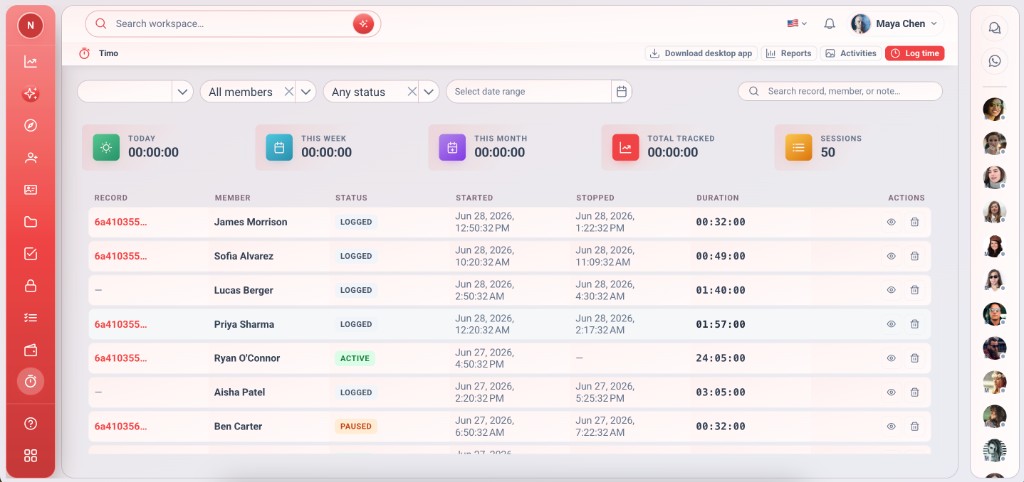
Track time on records with the Timo desktop companion.
Time tracked in a separate app rarely ties back to the project or client record for billing and accountability.
Timo logs sessions against workspace records. Use the desktop app or in-app timer — time stays with the work.
Tiefgehende Funktionen, die Teams vom ersten Tag an nutzen.
Timo runs on the desktop and knows which workspace record you're tracking.
Completed sessions appear in Vmoox for review and reporting.
Time attaches to the task, lead, or project row — not a generic bucket.
Filter and scan sessions by user, record, and date range.
See totals at a glance before exporting or invoicing.
Teams know who worked on what and for how long.
Time that belongs to the record — not a orphaned spreadsheet.
Timo closes the gap between delivery and invoice — without a separate timesheet product.
Install Timo once, then start sessions from your daily work.
Install the desktop app and sign in with your Vmoox account.
Choose the task, lead, or project row you're working on.
Start and stop from Timo while you work in other tools.
Sessions sync to the workspace table for managers and billing.
Reale Szenarien, in denen Teams diese Funktion jede Woche nutzen.
Track delivery time on client projects and support retainer reporting.
See where team hours go across apps and records.
Desktop timer for deep work; web app for quick adjustments.
Track time on records with the Timo desktop companion.
