

Record-linked timers
Pick a task, lead, or project row before you start — time never floats in a generic bucket.
Desktop time tracking
The official desktop companion for time tracking. Sign in with your workspace, pick a record, and sync sessions to Vmoox automatically.
Timo links every session to a workspace record — so billing, utilization, and handoffs use the same data your team already works in.
Timo shows who worked on what, for how long, and on which row — the same view managers use for reporting.
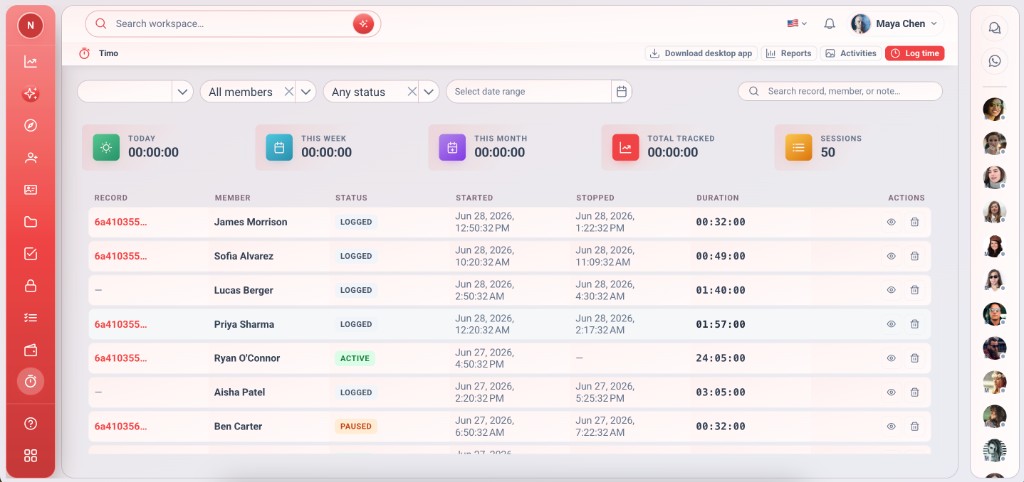
Timo is not a standalone timesheet — it is the desktop layer on top of Vmoox records.
Pick a task, lead, or project row before you start — time never floats in a generic bucket.
Running sessions update in Vmoox on a regular interval so totals stay current without manual export.
Control sessions from the desktop tray while you work in other apps.
See your daily tracked time at a glance and pick up where you left off.
Only apps you can access — with Timo enabled — appear in the desktop picker.
Filter sessions by member, record, and status in the Timo table inside Vmoox.
Install the Windows desktop app for the full timer experience, or use Timo directly in the Vmoox web app.
Install the desktop app, sign in with your Vmoox account, and track time on workspace records while you work.
If SmartScreen appears, choose More info → Run anyway. The installer is signed and published by Vmoox.
Open Vmoox in your browser to start, pause, and review Timo sessions on records — no download required.
Timo appears on records where the integration is enabled for your workspace apps.
Install once, sign in once, then track time from your daily task list.
Click Download for Windows above and run the setup wizard on your PC.
Run the installer, open Timo from the Start menu, and log in with your Vmoox credentials.
Pick an app where you have access and Timo is enabled — Leads, Tasks, or custom apps.
Choose the row you are working on and press start. Pause or end when you switch tasks.
Sessions appear in the Timo table and on the record for managers and billing.
Answers about installing Timo, syncing sessions, and using the web app.
Download Timo for Windows or sign in to the web app — sessions stay on the record your team already uses.
Already have an account? Open Vmoox web app
