

Das Problem
Generic AI assistants cannot see your pipeline, assign work in your task app, or draft follow-ups with real customer context.
Chat with a workspace-aware agent that understands your leads, projects, tasks, messages, and payments — like ChatGPT scoped to your business data.
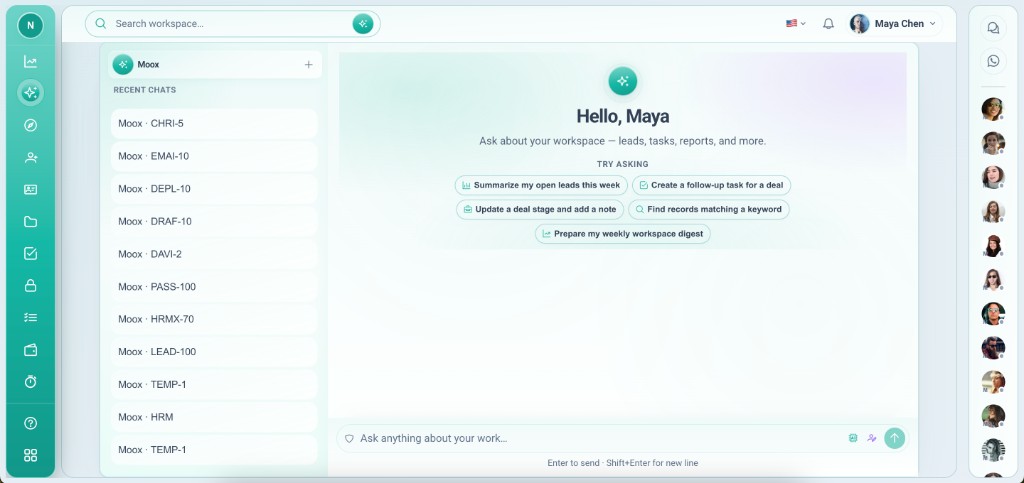
Generic AI assistants cannot see your pipeline, assign work in your task app, or draft follow-ups with real customer context.
Moox reads records, apps, and integrations in your workspace. Ask it to move deals, create tasks, summarize threads, or pull reports — actions stay in context and on your data.
Tiefgehende Funktionen, die Teams vom ersten Tag an nutzen.
Change fields, assign owners, and move pipeline stages by asking.
Understands Leads, Projects, Tasks, Payment, and Messaging together.
Ask for counts, trends, and stalled deals in plain language.
Follow-up messages and internal summaries from live data.
Only sees apps and records in the current workspace.
Dedicated chat home in Vmoox Apps — alongside Dashboard and Help Center.
AI that knows your workspace — not the public web.
Moox is the most important app in the catalog because it operates everything else.
Install Moox from Vmoox Apps when available on your plan.
Launch the Moox app from your workspace sidebar.
Reference leads, projects, or tasks by name.
Confirm updates Moox proposes on your records.
Follow up with reports or drafts in the same thread.
Reale Szenarien, in denen Teams diese Funktion jede Woche nutzen.
Which deals stalled? Move them and assign tasks in one conversation.
Summarize project status and open payments before a client call.
Bulk-update task assignees after a team change.
Chat with a workspace-aware agent that understands your leads, projects, tasks, messages, and payments — like ChatGPT scoped to your business data.
