

Das Problem
Growing teams need different access for owners, staff, and contractors — without exposing every app to everyone.
Access is controlled by subscription plan and workspace role — together.
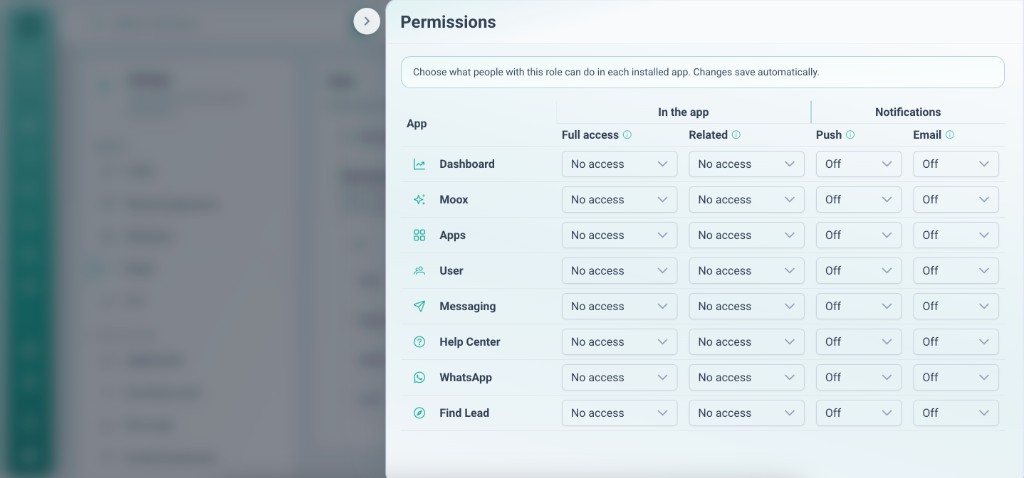
Growing teams need different access for owners, staff, and contractors — without exposing every app to everyone.
Plans unlock platform capabilities; workspace roles gate read/write per app. Owners control installs and membership.
Tiefgehende Funktionen, die Teams vom ersten Tag an nutzen.
Starter to Business — each tier unlocks more workspaces, apps, and platform features.
Owners configure the environment; members operate inside it.
Limit who can view or edit Leads, HRM, or custom apps.
Only owners add or remove apps from the workspace.
Join by invitation — no surprise access to client data.
Roles apply per workspace, not globally across clients.
Security and scalability without an IT project.
Your subscription unlocks the platform; workspace roles decide who touches each app.
Roles and plans work together from day one.
Choose the tier that matches workspaces, members, and features you need.
Owners set up apps; members execute inside them.
Decide who reads and who edits each installed app.
Adjust roles when contractors join or clients get their own workspace.
Reale Szenarien, in denen Teams diese Funktion jede Woche nutzen.
Give freelancers access to one client workspace and one app — not your entire account.
HR sees HRM; sales sees Leads; leadership sees both via role design.
Move from Starter to Pro when you need more workspaces, lines, or automation.
Access is controlled by subscription plan and workspace role — together.
