

הבעיה
Teams outgrow shared folders and scattered tools. Client work mixes with internal projects, and permissions become a spreadsheet nightmare.
Each workspace is an isolated environment for your apps, records, and conversations.
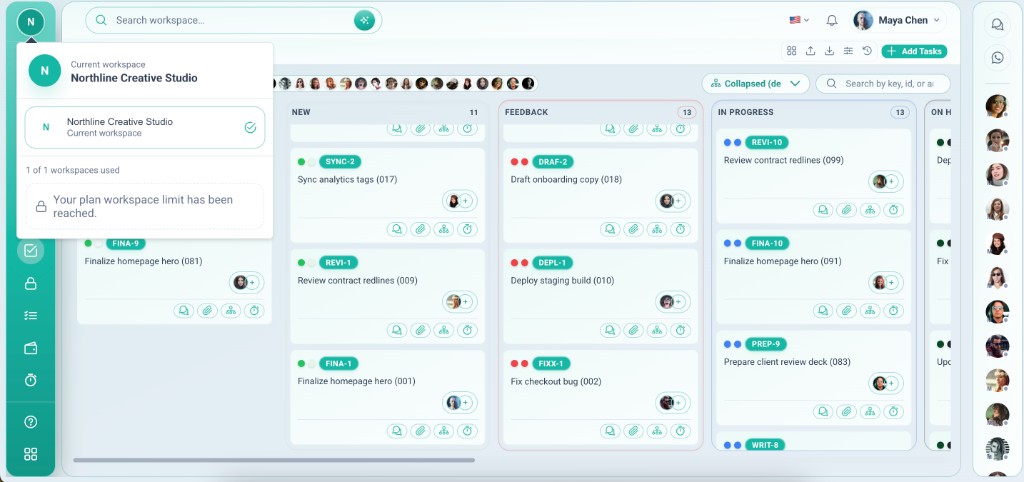
Teams outgrow shared folders and scattered tools. Client work mixes with internal projects, and permissions become a spreadsheet nightmare.
Vmoox workspaces isolate apps, records, and messaging per team or client. Invite members, assign roles, and switch contexts without logging out.
יכולות עמוקות שצוותים משתמשים בהן מהיום הראשון.
Jump between teams or clients instantly. Your apps, inbox, and records reload in context.
Add teammates by email, resend invites, and remove access when projects end.
Workspace owners manage apps, lines, integrations, and who can see what.
Records, files, and messages stay inside the workspace they belong to.
Run an agency, a side business, and internal ops from one Vmoox login.
Subscription plans define how many workspaces and members you can run.
Everything included when you run multiple teams or clients on Vmoox.
Workspaces are how Vmoox stays organized as you grow — not a bolt-on account switcher.
Most teams are live in under an hour.
Register, confirm your email, and land in your first workspace.
Add owners and members with the right roles before you install apps.
Open the Apps hub and add Leads, HRM, Tasks, or custom apps for this workspace.
Spin up a client or brand workspace and switch anytime from the header.
תרחישים אמיתיים שבהם צוותים משתמשים בתכונה כל שבוע.
Give every client a dedicated workspace — leads, projects, WhatsApp, and files stay separate.
Run different brands or regions without mixing pipelines, teams, or reporting.
Keep HR and internal ops in one workspace while customer delivery lives in another.
Each workspace is an isolated environment for your apps, records, and conversations.
