

הבעיה
Customer WhatsApp chats live on personal phones. Handoffs lose history and leads fall through the cracks.
Connect WhatsApp lines, link chats to leads, and manage customer conversations in one inbox.
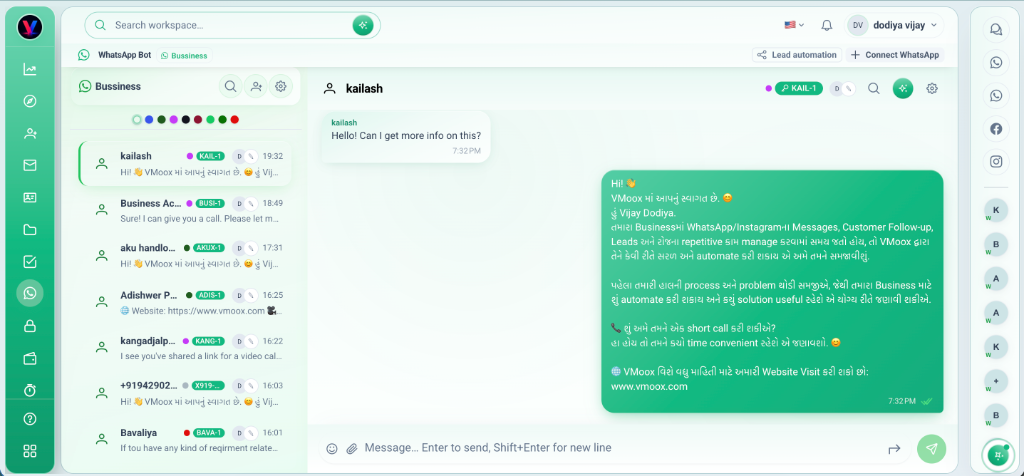
Customer WhatsApp chats live on personal phones. Handoffs lose history and leads fall through the cracks.
Connect workspace WhatsApp lines, link threads to lead records, assign owners, and search messages — all beside the deal.
יכולות עמוקות שצוותים משתמשים בהן מהיום הראשון.
Attach WhatsApp lines to the workspace for team visibility.
Queue, assign, and work customer threads without phone pass-around.
Connect a chat to a lead row — payments and files sit on the same deal.
Give each conversation an owner so follow-up is accountable.
Find past messages and customers quickly from the inbox.
Open the linked lead without losing the WhatsApp thread.
Customer conversations tied to CRM rows — not lost on personal devices.
WhatsApp is most powerful when every thread knows which deal it belongs to.
חיבור רשמי Meta Embedded Signup תוך 2 דקות.
Follow workspace setup for your WhatsApp line in Vmoox.
Assign owners and link conversations to existing or new lead records.
Use the record for files, notes, and payment while you chat.
Reassign chats with full history visible to the next teammate.
תרחישים אמיתיים שבהם צוותים משתמשים בתכונה כל שבוע.
Reply to prospects on WhatsApp while the lead record tracks stage and value.
Handle client questions with files and checklist items on the record.
Cover multiple lines across shifts with assignee and search.
Connect WhatsApp lines, link chats to leads, and manage customer conversations in one inbox.
